Why Your Landing Page Is Losing You Booked Jobs
An interactive audit for business owners: the gap between your ad clicks and your booked jobs almost always has one culprit, and it's not your budget.
If people click your Google Ads but don't call or book, your landing page is almost always the leak — not your budget. Send ad traffic to a dedicated page built around one goal, not your homepage. Google's Quality Score directly grades your "Landing page experience," and a confusing or slow page quietly raises your cost per lead even if your ad itself is great.

Grab a pen: find your gap
Write down how many people click your Google Ads every month. Now write down how many actually call you or book a job. Is there a huge gap between those two numbers?
If so, you're leaking money — and the culprit is almost always your landing page. Let's walk through exactly what a landing page is, why it makes or breaks your ad budget, and how to fix it so more of those clicks turn into booked jobs.
What is a landing page? (and why not your homepage)
A landing page is a specific, standalone page built for a single purpose: getting the visitor to take one action, such as booking a consultation or requesting a quote.
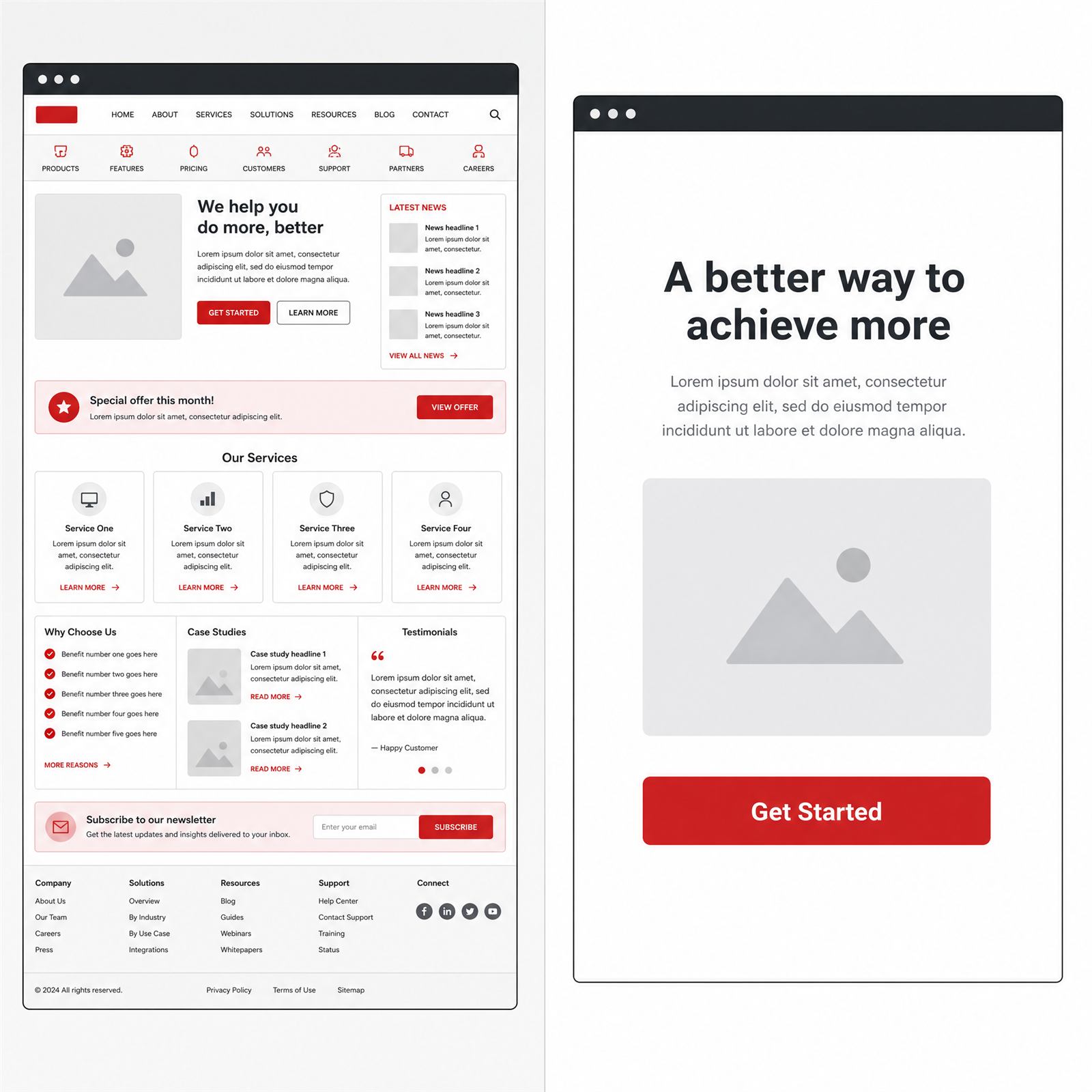
Many owners make the fatal mistake of sending ad clicks to their homepage. A homepage is a digital brochure — a menu, an "About Us" section, a list of all services, and links to social media. It's full of distractions. Google's official policies require ad destinations to offer unique value to users and be functional, useful, and easy to navigate. Someone clicking an ad for an emergency roof leak shouldn't have to hunt for your phone number.
And no, the fix isn't a bare form either. Google requires a genuinely good user experience — pages that feel like a trap just to harvest an email address can violate its destination requirements. You need a real, helpful page that directly answers the search that brought them there.
The best CRO landing page: what needs to be on it
CRO stands for Conversion Rate Optimization — designing your page so the highest possible percentage of visitors become leads.
Landing page experience is one of the three components of Google's Quality Score. A confusing page gets graded "Below average," which quietly hurts your ad performance even if the ad itself is strong. To earn an "Above average" score and a genuinely high-converting page, you need:
| Element | What It Needs to Do |
|---|---|
| Clear headline | Must exactly match the promise made in the ad that got them there. |
| Trust signals | Reviews, before-and-after photos, guarantees. |
| A single goal | Remove the top navigation menu — don't let visitors wander off. |
| Strong call to action | A big, bright button: "Get a Free Quote" or "Book Now." |
A/B testing: why do it
Don't guess what works — test it. A/B testing means building two slightly different versions of a landing page (Version A and Version B) to see which one books more jobs.
Testing is a core part of being a digitally mature marketer. Companies moving up the digital maturity scale actively use single-channel optimization and testing to improve results. You might test a red "Book Now" button against a blue one, or a short form against a long one — and let the data, not your gut, decide.
"You must make the path to booking as short as possible. Every extra screen is a chance for someone to change their mind."
The need for speed (and reducing friction)
Your landing page has to be fast and frictionless. If it's slow to load, users hit "back" before they even see your logo. Google also explicitly penalizes frustrating technical issues — a site that disables the browser's back button, for instance, violates Google's destination requirements outright.
A useful benchmark for how far this can go: a European finance company cut its online application process from eight screens down to three, purely by removing unnecessary friction, and converted noticeably more of its traffic as a result. Your lead form deserves the same treatment.
Two case scenarios
Bob's Roofing runs an ad for "flat roof repair." The click lands on Bob's homepage — shingle roofs, siding, gutters, company history. The homeowner, panicking about an active leak, can't find what they need and leaves. Google sees the bounce, grades the landing page experience as poor, and Bob's Quality Score — and his ad performance — takes the hit.
Sarah's Medspa runs an ad for "lip fillers." The click lands on a dedicated page: a headline about lip fillers, real before-and-after photos, a simple booking form. No links to laser hair removal or massages. The user books quickly. Google sees a highly relevant, useful page and rewards Sarah with a higher Quality Score. The dedicated landing page wins, every time.
A homeowner needs an emergency repair and clicks an ad on their phone.
Version A: takes 8 seconds to load, text is tiny, and the site disables the back button to trap the user — a direct violation of Google's technical destination policies.
Version B: loads instantly, fits the mobile screen perfectly, and offers a simple "Call Now" button in a streamlined, 3-step process — the same principle behind that finance company's eight-to-three screen cut.
Version B captures the lead every single time. Speed and ease of use are money, not just polish.
Common misunderstandings
- "My Google Ads budget is the only thing that matters." False. Quality Score is calculated from three components: expected clickthrough rate, ad relevance, and landing page experience. You can have the biggest budget in the world and still struggle if your landing page experience grades "Below average."
- "My ad will always send people to the exact URL I typed in." Not always. If you're running a Performance Max campaign with "Final URL expansion" turned on, Google's AI may automatically swap in a different page on your site if it believes that page better matches the user's specific search.
DeployStaff builds dedicated, single-goal landing pages for every campaign — matched headline, real trust signals, and a call to action that actually converts.
See Our PPC ProcessFlat fee, no long-term contracts. Get a free campaign plan.
FAQs for Business Owners
Ask your marketing team the three questions in this guide. If the answers are shaky, get a second opinion.
Get a Free Campaign Plan$95/week per channel. See how it works.
DeployStaff runs flat-fee Google and Meta Ads campaigns for local service businesses, built on dedicated landing pages designed to convert — not homepages hoping to.